# install.packages("pak")
pak::pak("perisphere-rwe/pericircle")

library(pericircle)Most of the time in an applied analysis is not spent fitting models. It is spent turning results into something a reader can use: tables with consistent labels, numbers rounded the same way in the text as in the tables, figures whose legends match the tables, and outputs that stay consistent when the analysis is re-run. The pericircle packages exist to take that work off the analyst’s plate.
This page walks through a small analysis from start to finish. Each step uses one package, and each package hands its output to the next:
| Step | Package | What it does |
|---|---|---|
| 1. Describe the data | perinary |
One data dictionary holds labels, units, category labels, and ordering for every variable |
| 2. Format the numbers | periglue |
Rounding rules for means, SDs, percentages, confidence intervals, and p-values |
| 3. Color the figures | peripal |
A consistent palette with drop-in ggplot2 scales |
| 4. Organize the project | pericircumference |
A targets project template with versioned reports and slides |
| 5. Define conditions | peridefs |
Validated ICD-9, ICD-10, and HCPCS/CPT code sets for real-world claims data |
The example uses the palmerpenguins data so that everything here can be run by anyone.
Setup
library(pericircle) attaches all of the packages at once, much like library(tidyverse):
We also use a few general-purpose packages:
library(dplyr)
library(tidyr)
library(ggplot2)
library(broom)
library(flextable)

data_peng <- palmerpenguins::penguins %>%
  select(species, island, sex, body_mass_g,
         bill_length_mm, flipper_length_mm) %>%
  drop_na()

data_peng
# A tibble: 333 × 6
species island sex body_mass_g bill_length_mm flipper_length_mm
<fct> <fct> <fct> <int> <dbl> <int>
1 Adelie Torgersen male 3750 39.1 181
2 Adelie Torgersen female 3800 39.5 186
3 Adelie Torgersen female 3250 40.3 195
4 Adelie Torgersen female 3450 36.7 193
5 Adelie Torgersen male 3650 39.3 190
6 Adelie Torgersen female 3625 38.9 181
7 Adelie Torgersen male 4675 39.2 195
8 Adelie Torgersen female 3200 41.1 182
9 Adelie Torgersen male 3800 38.6 191
10 Adelie Torgersen male 4400 34.6 198
# ℹ 323 more rowsStep 1: Write the data dictionary once (perinary)
Without a dictionary, labels like “Body mass (g)” end up retyped in every table, figure, and slide, and they drift apart over time. With perinary, they are written once.
as_data_dictionary() builds a starter dictionary from the data, and get_unknowns() lists what is still missing. It can even write the code needed to fill those gaps:
dd <- as_data_dictionary(data_peng)

get_unknowns(dd, as_request = TRUE)
A label to use for this variable in reports:
- species = ?
- island = ?
- sex = ?
- body_mass_g = ?
- bill_length_mm = ?
- flipper_length_mm = ?
Category labels for this variable (labels are shown in reports):
- species: Adelie = ?; Chinstrap = ?; Gentoo = ?
- island: Biscoe = ?; Dream = ?; Torgersen = ?
- sex: female = ?; male = ?
Variable units (e.g., age in years):
- body_mass_g = ?
- bill_length_mm = ?
- flipper_length_mm = ? Next, we fill in the gaps with the set_ functions:
dd <- dd %>%
  set_labels(
    species           = "Species",
    island            = "Island",
    sex               = "Sex",
    body_mass_g       = "Body mass",
    bill_length_mm    = "Bill length",
    flipper_length_mm = "Flipper length"
  ) %>%
  set_units(
    body_mass_g       = "g",
    bill_length_mm    = "mm",
    flipper_length_mm = "mm"
  ) %>%
  set_category_labels(
    sex = c(female = "Female", male = "Male")
  ) %>%
  # report model effects per 10 mm rather than per 1 mm
  set_divby_modeling(
    bill_length_mm    = 10,
    flipper_length_mm = 10
  ) %>%
  # sex is listed first in every table that uses this dictionary
  set_variable_order(sex, .before = 1)

# Every perinary function below will use this dictionary by default
set_default_dictionary(dd)
Step 2: Build a characteristics table (perinary + periglue)
A “Table 1” usually mixes counts and percentages for categorical variables with means and SDs for continuous ones. periglue handles the rounding:
peri_n_pct()formats a count with its percentage.peri_ester()rounds a mean and its SD together, following the convention that the precision of the SD sets the precision of the mean (Blackstone, 2016).
# categorical variables: n (%)
tbl_cat <- data_peng %>%
  pivot_longer(c(sex, island), names_to = "name", values_to = "level",
               values_transform = as.character) %>%
  count(species, name, level) %>%
  group_by(species, name) %>%
  mutate(value = peri_n_pct(n, n / sum(n))) %>%
  ungroup() %>%
  select(-n)

# continuous variables: mean (SD)
tbl_num <- data_peng %>%
  pivot_longer(c(body_mass_g, bill_length_mm, flipper_length_mm)) %>%
  group_by(species, name) %>%
  summarize(
    value = peri_ester(mean(value), sd(value), form = "{estimate} ({error})"),
    .groups = "drop"
  ) %>%
  mutate(level = NA_character_)
perinary takes care of the rest. index_rows() sorts the rows into dictionary order, and the translate_ functions swap raw names for labels:
tbl_one <- bind_rows(tbl_cat, tbl_num) %>%
  pivot_wider(names_from = species, values_from = value,
              values_fill = "0 (0.0%)") %>%
  index_rows() %>%
  mutate(
    group = if_else(is.na(level), "Mean (SD)", translate_names(name)),
    label = if_else(
      is.na(level),
      translate_names(name, units = "descriptive"),
      translate_categories(level, names = name)
    )
  )

tbl_one %>%
  select(group, label, Adelie, Chinstrap, Gentoo) %>%
  as_grouped_data(groups = "group") %>%
  as_flextable(hide_grouplabel = TRUE) %>%
  set_header_labels(label = "Characteristic") %>%
  bold(j = 1, i = ~ !is.na(group), bold = TRUE) %>%
  padding(i = ~ is.na(group), j = 1, padding.left = 15) %>%
  align(j = 2:4, align = "center", part = "all") %>%
  theme_booktabs() %>%
  autofit()
Characteristic | Adelie | Chinstrap | Gentoo |
|---|---|---|---|
Sex | |||
Female | 73 (50.0%) | 34 (50.0%) | 58 (48.7%) |
Male | 73 (50.0%) | 34 (50.0%) | 61 (51.3%) |
Island | |||
Biscoe | 44 (30.1%) | 0 (0.0%) | 119 (100.0%) |
Dream | 55 (37.7%) | 68 (100.0%) | 0 (0.0%) |
Torgersen | 47 (32.2%) | 0 (0.0%) | 0 (0.0%) |
Mean (SD) | |||
Body mass, g | 3,700 (460) | 3,700 (380) | 5,100 (500) |
Bill length, mm | 39 (2.7) | 49 (3.3) | 48 (3.1) |
Flipper length, mm | 190 (6.5) | 196 (7.1) | 217 (6.6) |
None of the labels in that table were typed in the table code. All of them came from the dictionary.
Step 3: Tabulate a regression model (perinary + periglue)
Model output from broom::tidy() has rows named like sexmale or speciesGentoo. translate_data(units = "model") rescales the predictors using the dictionary’s modeling divisors. index_terms() then matches each term back to its variable and category, adds reference rows, and sorts everything into dictionary order. peri_glue() and peri_pvalue() handle the formatting:
fit <- data_peng %>%
  translate_data(units = "model", apply_category_labels = FALSE,
                 apply_variable_labels = FALSE) %>%
  lm(body_mass_g ~ sex + species + bill_length_mm + flipper_length_mm,
     data = .) %>%
  tidy(conf.int = TRUE)

tbl_fit <- fit %>%
  filter(term != "(Intercept)") %>%
  index_terms() %>%
  mutate(
    # categorical terms are grouped by variable; continuous terms share a group
    group = if_else(is.na(label), "Body measurements", translate_names(name)),
    label = coalesce(label, translate_names(name, units = "model")),
    estimate = if_else(
      reference,
      "0 (reference)",
      peri_glue("{estimate} ({conf.low}, {conf.high})")
    ),
    p.value = if_else(reference, "", peri_pvalue(p.value))
  )

tbl_fit %>%
  select(group, label, estimate, p.value) %>%
  as_grouped_data(groups = "group") %>%
  as_flextable(hide_grouplabel = TRUE) %>%
  set_header_labels(
    label    = "Characteristic",
    estimate = "Difference in body mass, g (95% CI)",
    p.value  = "P-value"
  ) %>%
  padding(i = ~ is.na(group), j = 1, padding.left = 15) %>%
  align(j = 2:3, align = "center", part = "all") %>%
  theme_booktabs() %>%
  autofit()
Characteristic | Difference in body mass, g (95% CI) | P-value |
|---|---|---|
Sex | ||
Female | 0 (reference) | |
Male | 465.4 (380.6, 550.1) | <.001 |
Species | ||
Adelie | 0 (reference) | |
Chinstrap | -291.7 (-452.0, -131.4) | <.001 |
Gentoo | 707.0 (521.4, 892.7) | <.001 |
Body measurements | ||
Bill length, per 10 mm | 216.3 (75.7, 356.9) | .003 |
Flipper length, per 10 mm | 178.5 (121.4, 235.5) | <.001 |
Because set_variable_order() put sex first, sex is listed first here too, just as it was in the characteristics table. The rows labeled “per 10 mm” were also built automatically, from the units and modeling divisors in the dictionary.
Step 4: Make a figure that matches the tables (perinary + peripal)
translate_data() applies labels and category order to the data before plotting, so axis titles and legends use the same wording as the tables. scale_color_peripal() adds the Perisphere palette. For small numbers of groups, it samples the palette from the center outward, so brand colors come first:
data_plot <- translate_data(data_peng, units = "descriptive")

ggplot(data_plot) +
  aes(x = flipper_length_mm, y = body_mass_g, color = species) +
  geom_point(alpha = 0.6) +
  geom_smooth(method = "lm", se = FALSE) +
  scale_color_peripal(3) +
  labs(
    x = attr(data_plot$flipper_length_mm, "label"),
    y = attr(data_plot$body_mass_g, "label"),
    color = attr(data_plot$species, "label")
  ) +
  theme_minimal(base_size = 13) +
  theme(legend.position = "top")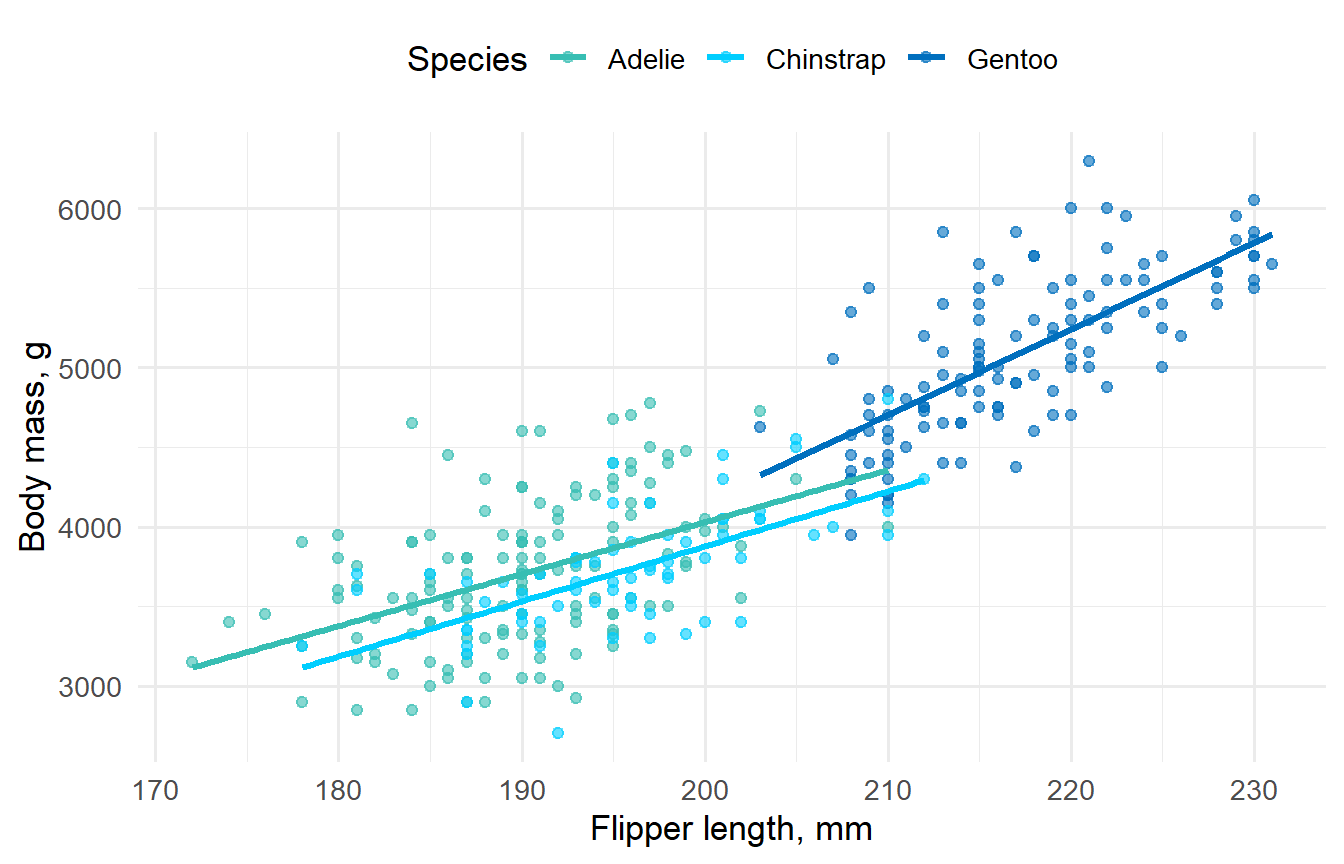
Step 5: Put results in the text (periglue)
Numbers in the text should match the tables exactly. as_inline() turns a results table into a nested list you can index by name. peri_glue() works like glue::glue(), but it rounds every number it receives:
inline <- fit %>%
  mutate(text = peri_glue("{estimate} g (95% CI {conf.low}, {conf.high})")) %>%
  as_inline(tbl_variables = "term", tbl_values = "text")

mass_by_sex <- data_peng %>%
  group_by(sex) %>%
  summarize(mean = mean(body_mass_g), sd = sd(body_mass_g))
After adjustment for species, bill length, and flipper length, male penguins weighed 465.4 g (95% CI 380.6, 550.1) more than female penguins. Without adjustment, mean body mass was 4,545.7 g for males and 3,862.3 g for females.
The sentence above was written in R Markdown as:
male penguins weighed `r inline$sexmale` more ...
mean body mass was `r peri_glue("{mass_by_sex$mean[2]} g")` for males ...
If the data or the model change, the text updates with them.
Scaling up: projects and real-world data
The penguin example covers a single analysis. Two more packages handle the work around it.
pericircumference: a standard project layout
use_pericircumference() sets up a new project as a targets pipeline. It includes templates for the data, the dictionary (a meta target built with perinary), the summary statistics, and Word or HTML reports and slides. Every report is saved under a version number, and finalize_version() prints the changelog for that version so it can be sent to collaborators. Finalized versions are never overwritten:
library(pericircumference)

use_pericircumference(include_tutorials = TRUE)  # scaffold the project
targets::tar_make()                              # build report-v0-1.docx, slides-v0-1.pptx
finalize_version(major = 0, minor = 1) # lock v0.1 and print its changelogperidefs: condition definitions for claims data
Real-world evidence studies depend on how conditions are defined in claims data. peridefs provides versioned, tested code sets, so a definition used in one study can be reused exactly in the next:
get_hypertension_v1_codes(code_type = "dx_icd10")# A tibble: 23 × 5
type code priority version definition
<chr> <chr> <int> <chr> <chr>
1 dx_icd10 I10 1 v1 Essential (primary) hypertension
2 dx_icd10 I11 1 v1 Hypertensive heart disease
3 dx_icd10 I110 1 v1 Hypertensive heart disease with heart failure
4 dx_icd10 I119 1 v1 Hypertensive heart disease without heart fai…
5 dx_icd10 I12 1 v1 Hypertensive chronic kidney disease
6 dx_icd10 I120 1 v1 Hypertensive chronic kidney disease with sta…
7 dx_icd10 I129 1 v1 Hypertensive chronic kidney disease with sta…
8 dx_icd10 I13 1 v1 Hypertensive heart and chronic kidney disease
9 dx_icd10 I130 1 v1 Hypertensive heart and chronic kidney diseas…
10 dx_icd10 I131 1 v1 Hypertensive heart and chronic kidney diseas…
# ℹ 13 more rowsEach definition also includes a plain-language description of how it should be applied:
spec_hypertension_v1── Hypertension (v1) ───────────────────────────────────────────────────────────Condition: `hypertension`Condition def:ℹ Any of the following:• ≥1 inpatient claim with an ICD-9 discharge diagnosis of 401.x, 403.0x,
403.1x, or 403.9x, or ICD-10 discharge diagnosis code of I10, I11.x, I12.x,
I13.x, I15.x, I12.0, I12.9, I16.x in any discharge diagnosis position.• ≥2 outpatient physician visit claims with the same diagnosis codes, at least
30 days apart.• ≥2 pharmacy fills for an antihypertensive medication (see spec_hypertension)Code sets: `dx_icd9`: 13 condition / 0 outcome codes `dx_icd10`: 23 condition / 0 outcome codesWhen a definition is updated, it is released as a new version (v2, v3, and so on) instead of replacing the old one. Existing analyses keep the definition they were written with, and their results never change because of a package update.
Learn more
perinary: https://perisphere-rwe.github.io/perinaryperiglue: https://perisphere-rwe.github.io/periglueperidefs: https://perisphere-rwe.github.io/peridefsperipal,pericircumference, andpericircle: https://github.com/perisphere-rwe